
BMW coding,
in plain English.
E-Sys MAX sits inside your E-Sys and turns it into a tool you can read: every setting with an English name, ready-made changes for your car, a vehicle order helper, full backups and a history of every change.
3 days on your own car, no card needed. Lifetime licence $99.
Everything E-Sys leaves to guesswork
E-Sys is BMW's engineering tool: powerful, but full of German abbreviations and bare numbers. E-Sys MAX adds the missing half.
What can I code?
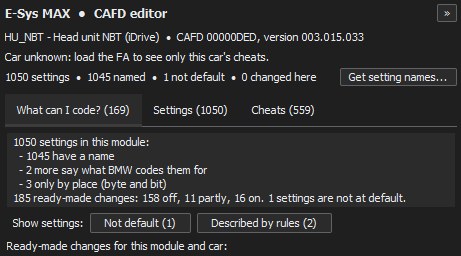
Open a module in the CAFD editor and see every ready-made change that fits your car: what is already on, what is off, applied with one click and checked before you code.
English setting names
Thousands of coding settings named in plain English, with their values explained, so you know what a bit does before you touch it.
Vehicle order helper
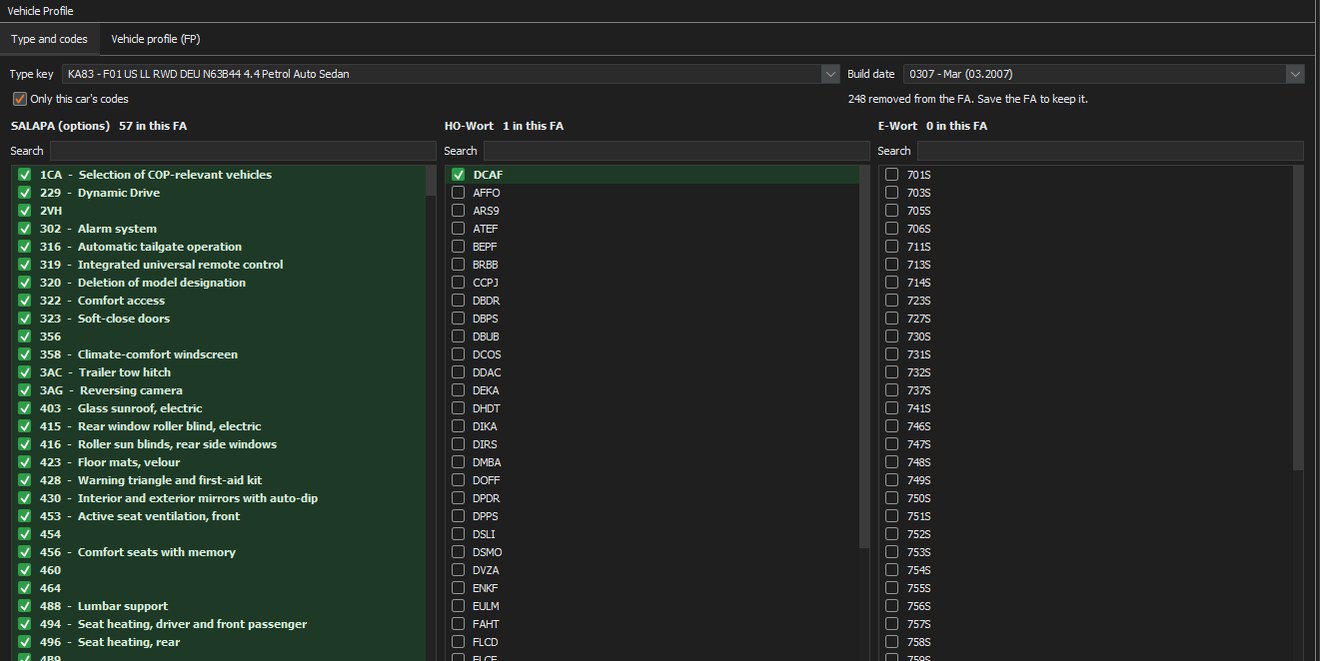
Every option code, HO word and E word of your FA in English (5,600+ codes), searchable, with a tick to add or remove one.
Search the whole car
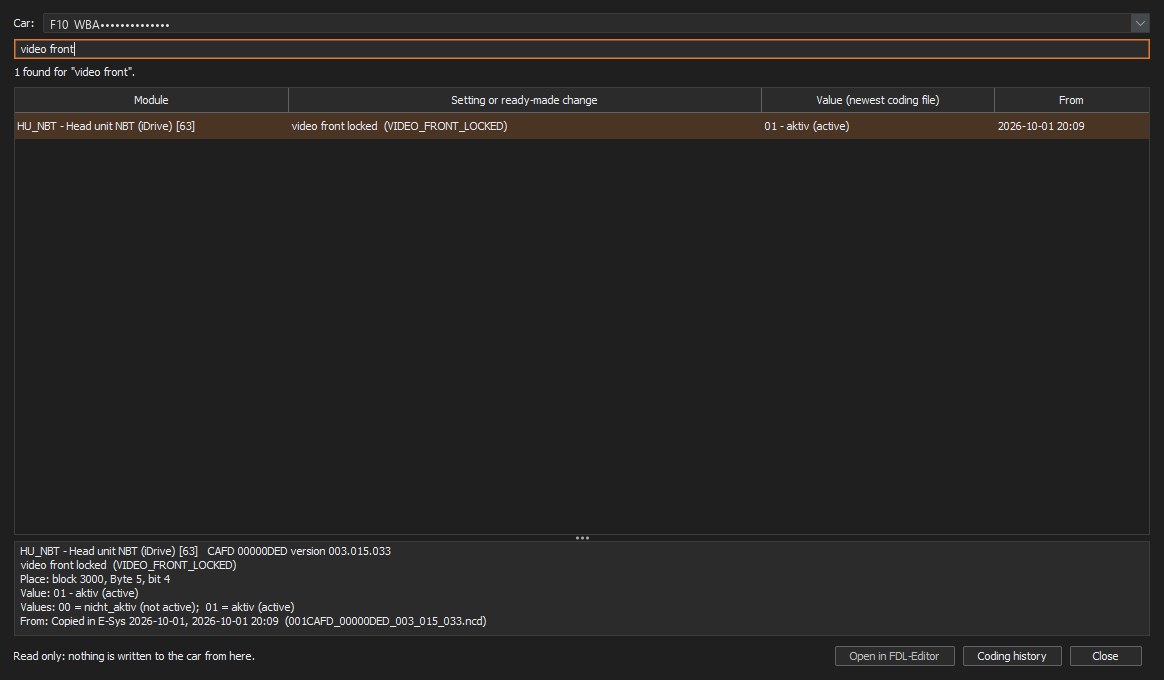
Type "mirror", "start stop" or "video" and find the setting in every module of your car, with its current value. Double-click to open it.
Coding history
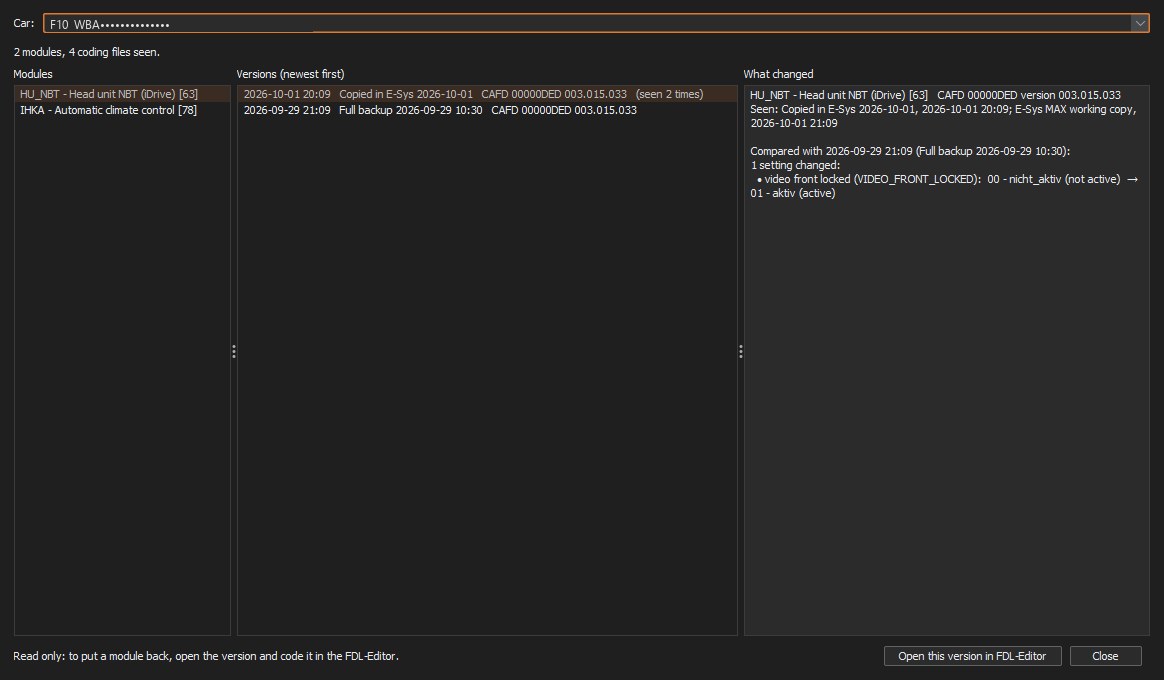
Every version of every module, and exactly which settings changed between them. Put an older version back in two clicks.
Full backup
The vehicle order, SVT and the coding of every module saved in one go, before you start. Plus a quick backup of just the open files.
Fault scan
Read the fault memory of every module, see what each code means, save the list and clear faults when you are done.
SVT toolbox
Hardware, bootloader, software and coding of every module in a readable table, actual against target, with the cheats each module has.
Car report (PDF)
Model, build date, options in English, modules, I-step, coding changes and the last fault scan: one PDF to keep or hand to a customer.
Safe by design
A write to the car only happens when you press Yes, with No as the default. The car's VIN and E-Sys must agree first.
Battery voltage on screen
The KL30 voltage in the toolbar while you are connected, so a weak battery never surprises you halfway through coding.
Launcher & dark theme
Start any installed E-Sys version, check the car connection, update with one click, and give E-Sys a calm dark theme.
Find any setting in seconds
No more opening module after module. Search every coding file of your car at once, in English or by BMW's own name.
- The value in your newest coding file, and where it came from
- Block, byte and bit, and what every value means
- Opens the setting in the FDL-Editor with one double-click
Know exactly what changed
E-Sys MAX keeps every coding file it sees, from full backups and from E-Sys, and compares them for you.
- Every module, every version, newest first
- "1 setting changed: video front locked, not active to active"
- Undo a change by opening the older version
Running in five minutes
E-Sys MAX adds to the E-Sys you already have. It does not replace it, and it does not include it.
Download & install
Get the installer, run it. The E-Sys MAX launcher finds your E-Sys installations by itself.
Start your trial
In the launcher: Help > Licence > Start the free 3-day trial. One click, no card. Or paste the licence you bought.
Code with confidence
Press play on your E-Sys version. E-Sys opens with E-Sys MAX inside: back up first, then code in plain English.
One price, every feature
Every plan has everything. A licence is for one PC; moving to a new laptop is always possible.
Free trial
Everything, on your PC and your car, for three days. No card.
- All features
- All setting names
- One car: the first car you connect
- One trial per PC
1 year
A full year of E-Sys MAX on one PC.
- All features
- All updates during the year
- New setting names as they come
- Move to a new PC
Lifetime
Pay once, keep E-Sys MAX on one PC.
- All features
- All future updates
- New setting names as they come
- Move to a new PC
Pay by card (Stripe) on this site, or in Telegram with @EsysMaxbot. Prices in US dollars.
Questions
Is E-Sys included?
No. E-Sys MAX adds to BMW's E-Sys and works with the E-Sys, PSdZData and ENET cable you already use. It finds your installed E-Sys versions by itself.
Which cars does it work with?
The BMW models E-Sys codes: the F series and the G series. Try it on your car for free first. Setting names are most complete for the F series; G-series names grow with every update.
Can it change my car without me knowing?
No. Reading, searching, history and reports never write to the car. A write only happens when you press Yes in E-Sys or in E-Sys MAX, and No is always the default.
What is in the free trial?
Every feature for 3 days, on one car: the first car you connect with E-Sys MAX becomes the trial's car. E-Sys itself keeps working on every car; a licence unlocks E-Sys MAX on all of them. One trial per PC.
Does it need the internet?
Coding does not. The licence is checked online when the launcher starts, and E-Sys MAX keeps working offline for up to 7 days after the last check. Connect once a week and you never notice it.
I reinstall Windows or change the SSD. Do I lose the licence?
No. Your licence is tied to the motherboard, not to Windows: a Windows reinstall, a new SSD or more RAM keep it. If your licence text is gone after a reinstall, get it again on the licence page or from @EsysMaxbot.
I bought a new laptop. Can I move my licence?
Yes. Open Help > Licence > Get a licence on Telegram on the new laptop and choose "Move my licence to this PC". Once approved, the licence works on the new laptop and the old one stops.
Can I use one licence on two PCs?
A licence is for one PC at a time. For a second laptop, buy a second licence, or move your licence between them when you need to.
How do I pay?
By card on the buy page (secure Stripe checkout; your licence appears right after paying), or in Telegram with @EsysMaxbot.
Try it on your car today
Three days, every feature, on your own car, no card. If it saves you one wrong bit, it paid for itself.